The Revenue Leak Audit: 9 Places Your B2B Pipeline Is Losing Money
A diagnostic framework for RevOps leaders, CROs, and founder-CEOs who suspect their number isn't a coverage problem.
Gartner estimates revenue teams lose roughly 10% of potential revenue every year to process gaps, human error, and disconnected systems. That's not lost deals at the goal line. It's revenue that leaks out at every stage between "lead arrives" and "deal closes" — quietly, invisibly, and almost never inside any dashboard you currently look at.
Revenue doesn't fail at the big moments. It leaks in the gaps.
I've run audits on more than 40 B2B revenue stacks in the last 18 months. The leaks are remarkably consistent. Across companies of wildly different sizes, industries, and tech stacks, the same nine operational gaps account for the vast majority of "we should have hit that number" outcomes. This post walks through each one — what it looks like, how to diagnose it in your own data, and the operational fix that closes it.
If you only read one section, skip to The 9 Leaks below. If you want a framework you can actually run yourself in 30 days, read on.
What is a revenue leak audit?
A revenue leak audit is an operational diagnostic that maps where revenue exits your funnel due to fixable process gaps — not strategic ones.
It's different from a sales audit (which reviews rep performance), a tech audit (which reviews your stack), or a strategic review (which reviews positioning and pricing). A leak audit is downstream of all three. It assumes your strategy is roughly correct, your reps are capable, and your tools work. It then asks one question: where is revenue getting stuck or lost between activities that should already be working?
That's a narrower question than "how do we grow?" — and it's exactly why most leadership meetings miss it. QBR dashboards show you what happened. A leak audit shows you where the system broke and what to change so it stops breaking.
Most pipeline reviews are theater. They look at the number. They don't look at the system producing the number.
Revenue leak vs revenue leakage: what's the difference?
A quick note on terminology, because the search results for "revenue leakage" are dominated by a different conversation.
Revenue leakage (as the term is typically used in SaaS and finance) refers to billing errors, contract mismanagement, missed renewals, and pricing inconsistencies — the gap between revenue earned and revenue collected. It's primarily a finance and billing problem.
Revenue leak (as we use it at Full Throttle RevOps) refers to operational gaps in your sales pipeline — leads that don't get routed, follow-ups that don't happen, stages that mean different things to different reps, forecasts built on stale deals. It's a sales operations and RevOps problem.
Both cost you money. They're solved by different teams using different methods. This post is about the second category.
The four-stage framework
Every B2B pipeline has the same four stages where revenue can leak: Lead In, Follow Up, Pipeline, and Close. Each stage has predictable failure points that show up in almost every company I audit. Here's the map.
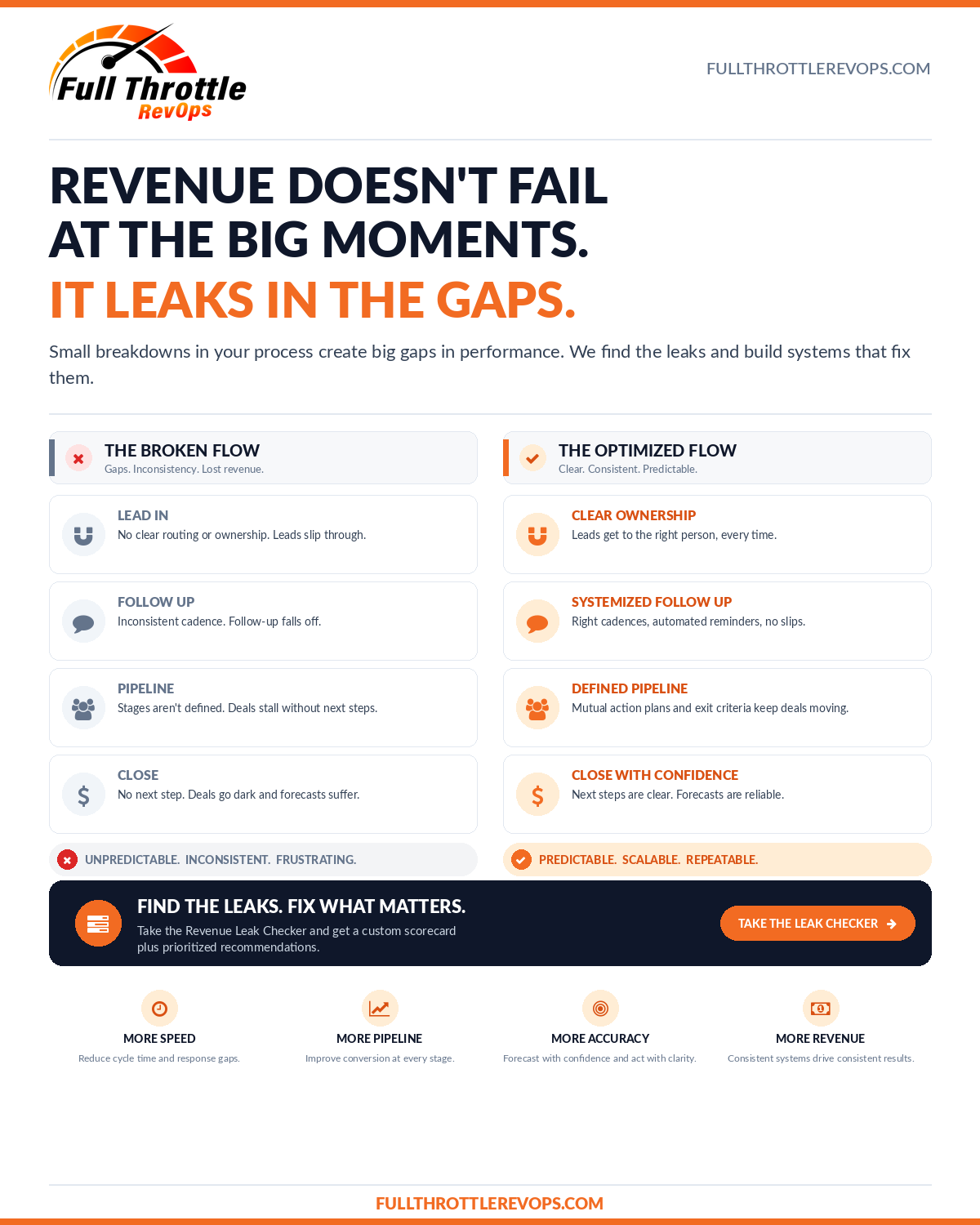
Inside those four stages, nine specific leaks account for ~80% of the operational revenue loss I find. Here they are.
The 9 leaks
LEAD IN
1. Unrouted leads
What it looks like: Your highest-converting lead source — referral, partner, inbound demo request — drops a lead into your CRM, and it sits in a queue for hours or days before anyone touches it. Sometimes the routing rule is broken. Sometimes there's no rule. Sometimes the rep it routed to is OOO.
Diagnostic: Pull the median time from lead creation to first human contact, segmented by lead source. If your inbound-demo leads take more than 15 minutes, you have this leak.
The fix: Build a routing rule with explicit fallback ownership (primary owner → backup owner → round-robin pool) and an SLA — most B2B teams should target 5-15 minutes for inbound-demo, under 4 hours for content-source leads. Alert on SLA breaches in real time, not on a weekly dashboard.
2. No ownership rules
What it looks like: A lead arrives, gets touched by an SDR, gets "passed" to an AE, gets re-qualified by RevOps, and then sits with three people having vague accountability. When the lead goes dark, everyone assumes someone else is following up.
Diagnostic: Pull a sample of 20 leads from last month. For each, ask "who specifically owns this right now?" If you can't answer in under 10 seconds for each, you have this leak.
The fix: Single-owner accountability at every stage. The "owner" field changes when ownership formally transfers — never sits ambiguous. Build a queue review cadence (weekly) where unassigned or orphaned leads get reclaimed.
FOLLOW UP
3. Inconsistent cadence
What it looks like: Reps start strong. Touch #1 happens within an hour. Touch #2 the next day. Touch #3 maybe. After that, the cadence collapses into "I'll get to it when I get to it." 70% of follow-up effort goes into the first three touches, even though most B2B deals require 7-12 touches to convert.
Diagnostic: Pull average touches per lead before disposition. If most "no decision" leads got 3 or fewer touches, you're losing winnable deals to cadence collapse, not to disinterest.
The fix: Codify the sequence. Whether you use Outreach, Salesloft, HubSpot Sequences, or your CRM's native automation, lock the cadence so touches 4-12 happen on autopilot. Manual cadence is hope as a strategy.
4. No multi-threading
What it looks like: Your champion goes silent. Or quits. Or gets reorged. And you have no other relationships inside the account — which means the deal goes dark with them.
Diagnostic: Look at deals over $25K in late stages (Proposal, Negotiation). What % have two or more buyer-side contacts engaged in the last 14 days? If it's under 60%, you have this leak.
The fix: Make multi-threading a stage exit criterion. A deal cannot move from "Discovery" to "Proposal" until the rep has documented at least two buyer-side contacts. Add it to your stage definition and enforce it in the CRM.
PIPELINE
5. Fuzzy stage definitions
What it looks like: Ask three reps what "Qualified" means in your CRM. You'll get three different answers. Research consistently shows only ~13% of sales and marketing teams agree on what defines a qualified lead. This isn't a knowledge problem; it's a definition problem.
Diagnostic: Pick your most ambiguous stage. Ask three reps to write down the entry and exit criteria. Compare answers. If they don't match, you have this leak.
The fix: Every stage gets a written, one-page definition with explicit entry criteria (what must be true to enter this stage) and exit criteria (what must be true to leave). Tie them to buyer milestones, not internal activities. "Demo completed" is an internal action. "Buyer has confirmed the problem, budget range, and decision timeline" is a buyer milestone.
6. No exit criteria
What it looks like: Deals stall mid-stage with no defined unblock. They sit in "Evaluation" for 60 days and nobody knows what specifically needs to happen to move them forward — or to disqualify them out.
Diagnostic: Measure average time-in-stage by stage. Find any stage where the median time-in-stage is more than 2x your sales cycle's target. That stage is missing exit criteria.
The fix: Same as #5 — write explicit exit criteria. Then add a tripwire: any deal that exceeds 1.5x the median time-in-stage gets flagged for a forced disposition (advance, push out, or close-lost) within 7 days.
7. Missing mutual action plans
What it looks like: Your rep has a forecast date. The buyer has no idea your rep has a forecast date. There's no shared timeline, no shared owner list, no shared list of dependencies. The deal "should close end of month" purely because the rep hopes it will.
Diagnostic: Pull all deals over $X (your top quartile threshold) in late stages. What % have a written, buyer-shared mutual action plan attached? If under 50%, you have this leak.
The fix: Mutual action plans (MAPs) for every deal above your threshold. A one-page document that lists every step required to close, every owner on both sides, every dependency, and dates. Shared with the buyer. Reviewed every two weeks. Required for the forecast.
CLOSE
8. Stale forecast
What it looks like: Your forecast roll-up includes deals where no one has talked to the buyer in 14+ days. The deal is "Commit" because the rep hopes it'll close — not because the buyer has confirmed it'll close.
Diagnostic: Pull your current commit-tier forecast. What % of those deals have logged activity (call, email reply, meeting) in the last 7 days? If under 80%, your forecast is built on hope.
The fix: Add a forecast hygiene rule: any deal in commit without buyer-side activity in the last 7 days drops out of commit automatically. Reps can re-promote it after a meaningful touch. Salesforce's 2026 State of Sales report found teams that hit 90%+ forecast accuracy grow 30% faster than teams under 80% — and forecast accuracy is mostly a hygiene problem, not a math problem.
9. No loss post-mortems
What it looks like: Deals are lost. The CRM gets updated with a reason — usually "no decision," "lost to competitor," or "budget." Nobody reviews the patterns. The same losses repeat next quarter.
Diagnostic: Pull your closed-lost deals from the last 90 days, segmented by loss reason. What % have a meaningful, actionable reason documented (e.g., "missing integration with X," "couldn't show ROI within their stated payback window") versus a generic placeholder ("no decision," "timing")? If most are generic, you have this leak.
The fix: A monthly closed-lost review with three required outputs: (1) the actual reason in operational terms, (2) at least one process change that would have changed the outcome, and (3) an owner for that change. Without owned action items, post-mortems are theater.
How to run a revenue leak audit yourself in 30 days
The 9 leaks above give you the framework. Here's the cadence:
Week 1 — Pull diagnostic data. For each of the 9 leaks, pull the diagnostic data point listed. You don't need to do anything with it yet — just measure. Most of this is reports your CRM can already generate.
Week 2 — Rank by revenue impact. For each leak you find, estimate the revenue impact. Don't aim for precision. A rough range is enough: which 2-3 leaks are costing you the most money?
Week 3 — Pick your top 2-3 leaks and design fixes. Don't try to fix all 9. Pick the 2-3 with the highest revenue impact and the lowest implementation friction. Write the operational change. Assign an owner.
Week 4 — Implement and instrument. Roll out the fixes. Add the relevant tripwire metric to a dashboard so you'll see regression if it happens. Schedule a 30-day check-in.
This article covers nine pipeline checks you can run in your own data. For a broader look across Marketing, Sales, Operations, and Finance, try the Revenue Leak Checklist. Answer 12 questions and get practical next steps based on your answers. No email required.
The bottom line
Revenue doesn't fail at the big moments. It leaks in the gaps. Most of those gaps are operational, not strategic. They're predictable. They're fixable. And they almost never show up in the dashboards your leadership team looks at every week.
That's the difference between a system and a report.
Use the free Revenue Leak Checklist to flag gaps across four business cycles and build an action plan you can download. It is a starting point for a closer review, with no email required.
Revenue Operations is how modern businesses scale.
Full Throttle RevOps is how it actually gets implemented.
Want to see where your revenue system is leaking? Book a Discovery Call.